How can we help?
We're usually great at keeping secrets, but we've laid out all the answers here. Search below or browse our categories to get sorted in a flash.
Categories
Can you help me book an offer?
Yes! If you prefer a more personal touch, need recommendations, or are having trouble completing your booking online, our dedicated support team is happy to act as your personal booking concierge.
You can reach our booking specialists directly by calling +44 203 878 5190 from 9AM to 6PM.
How do I make a booking?
- Select your dates on the offer page.
- Choose your room type or package.
- Click Book and review the summary.
- Enter payment details and click Pay Now.
You’ll receive a confirmation email with your booking ID, and the booking is saved in My Bookings. Log in before checkout so any account credit applies automatically. Note that two different room types can’t be combined in one transaction, book them separately.
How are prices calculated, and why do they change?
Prices are exclusive member rates negotiated with partners and verified at launch. They update in real time as allocations sell out, so a price can rise once the lowest-priced rooms are claimed, this isn’t an error. Package prices can also fluctuate while you browse due to dynamic changes in flight costs. Hotel-only deals are priced per room (two sharing); packages are usually per person. For a full breakdown, click Offer Details or check the payment summary at checkout.
How do I search and filter for a holiday?
Use the filters at the top of the homepage: enter a destination, choose your dates, set travellers and rooms, then apply Trip type, Facilities and Budget filters and choose Hotel-only or Packages. If your dates are flexible, search without dates to see the full range and best prices.
Filters or map not working? refresh, clear your cache and cookies, try a different browser or the app, and disable any VPN, which can interfere with how deals display.
Why can’t I find the hotel or dates I want, and how far ahead can I book?
Our deals are limited-time sales based on partner inventory, so a hotel or date may have sold out or the offer may have ended. There’s no minimum or maximum lead time, you can book last-minute or up to 6–12 months ahead, as long as availability shows in the calendar.
Dates greyed out or hotel not listed? Reach out to our Concierge Team, we can sometimes request extra space or a bespoke booking window from the hotel.
Can I book for one person, more than two adults, or with children?
Solo travellers: set the Travellers selector to 1 adult. Some partners offer a discounted single rate; otherwise the standard room rate applies.
More than two adults / extra rooms: use the Offers and Availability selection bar. A third adult in one room is only possible if the offer’s Room capacity allows it — otherwise book a larger room type or a second room.
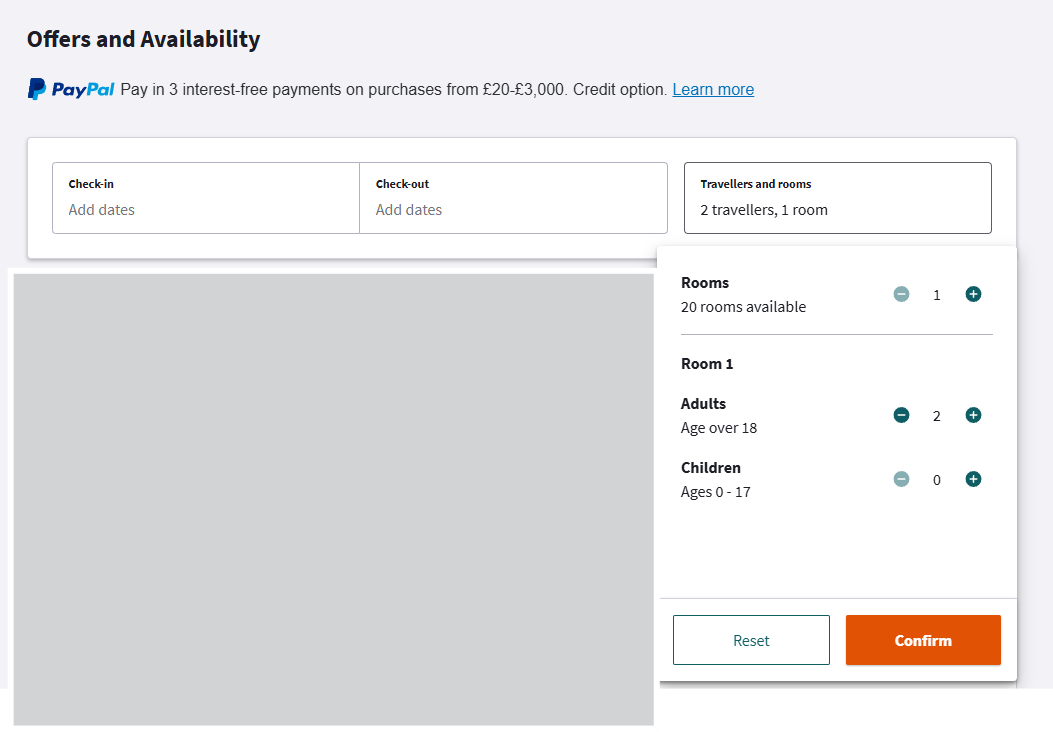
Children and infants: check the Room capacity / “Sleeps how many?” section first. For packages, enter all traveller birth dates at the start of booking. For hotel-only and hotel + flights, if an offer specifies two adults, children can’t be added — contact the hotel after booking.
For complex group or family bookings, please reach out to our Concierge team, they are happy to assist!
What are the main parameters that determine how we rank our search results?
1. General Mechanism
The order of offers displayed is determined by a proprietary Learning to Rank (LTR) algorithm. This system assigns a score to each offer by processing hundreds of "features" (data points) to predict the likelihood of a booking.
2. Main Parameters
The LTR system calculates rankings based on the following parameters, listed in descending order of their impact on the final position:
User-Offer Personalisation (Highest Importance)
The primary factor in predicting a user's preference is the alignment between their profile and a specific deal. The model calculates this by combining three independent signals: a core "match score" (derived from advanced collaborative filtering of user and offer profiles), the user's historical engagement activity, and their past booking spend profile (margin segment). To ensure high accuracy, the system analyses 150 distinct features per territory, utilising both personalised and generic data sets.
Search Intent & Relevance (High Importance)
We prioritise offers that match the specific keywords entered (e.g., "Spa," "Berlin") or destination filters. The system uses "multi-match" templates to search across editorial titles and descriptions.
Commercial Performance & Popularity (High Importance)
The algorithm heavily weights Margin per Page View (GPV). Offers that have demonstrated high popularity and sales performance over recent periods (yesterday, last 7 days, last 60 days) are ranked higher.
Inventory Availability (Medium Importance)
To ensure a positive user experience, the system prioritises hotels with a higher number of available dates from the current view date and within the next 60 days.
Offer Attributes & Quality (Secondary Importance)
This includes the discount percentage, star ratings, and review scores (e.g., reviews higher than 3 or 7). Specific tags such as "City," "Spa," or "Pet-friendly" also influence the ranking based on their historical impact on conversions.
3. User Control
The default ranking is "Recommended." You can override this automated ranking at any time by selecting alternative sorting criteria (e.g., "Lowest price," "Newest") which will reorganise the results based on that single, specific metric regardless of the LTR score.
Still need help?
Our team is here to help. We only use your personal data to securely respond to your enquiry. See our Privacy Notice for details.
Chat with us
Need a quick answer? Chat directly with our support team in real-time for immediate help with your booking or trip.
Email us
Detailed query or docs? Email us with your booking ID in the email body. AI handles some replies, with our team monitoring and on hand.
Call us
Prefer to speak to someone? Our support team can talk you through any issues.